From Vibe Coding to Symbolic Reasoning: How Serena MCP Gives AI Agents X-Ray Vision
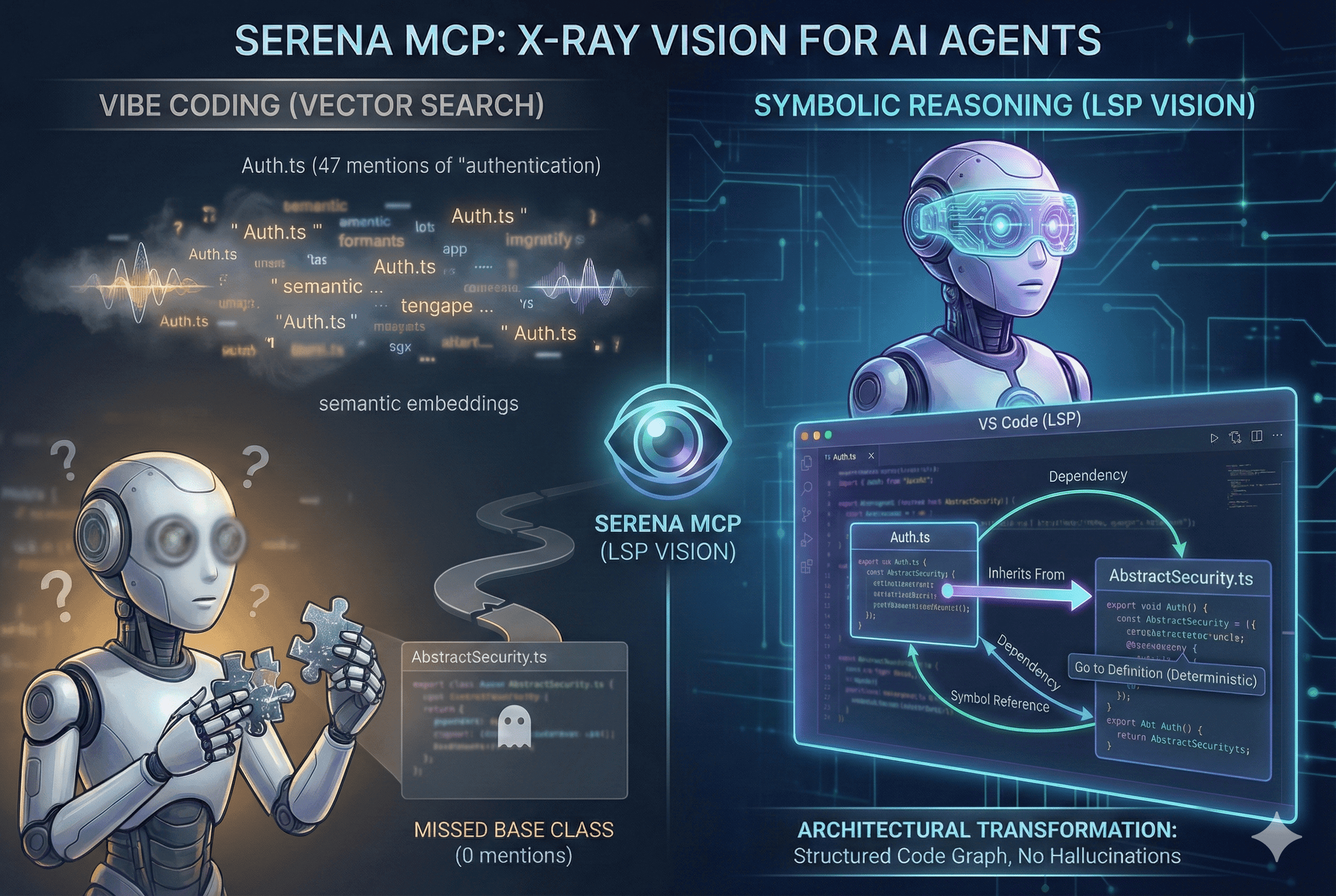
I asked an AI agent to refactor a class that inherits from AbstractSecurity.ts. The agent searched for "authentication" using vector embeddings, retrieved Auth.ts (which mentions "authentication" 47 times), and completely missed the base class (which mentions it zero times).
Not because the model was dumb. Because we gave it the wrong eyes.
Vector search treats code like prose—fuzzy, semantic, probabilistic. But code isn't prose. Code is a hyper-structured graph of dependencies, inheritance chains, and symbol references. When you navigate with semantics instead of structure, you get hallucinations, partial refactors, and broken builds.
Serena MCP solves this by giving AI agents what human developers have had for decades: Language Server Protocol (LSP) vision. The same symbolic, deterministic code understanding that powers "Go to Definition" in VS Code, now available to AI agents through the Model Context Protocol.
This isn't incremental improvement. This is architectural transformation.
The Fundamental Flaw: Why RAG Fails at Code
The industry standard for AI coding assistants is Retrieval-Augmented Generation (RAG) with vector embeddings. Chunk your code, embed it into high-dimensional vectors, store it in Pinecone or Milvus, and retrieve by cosine similarity.
The failure modes are structural:
The Three Deadly Problems
1. Semantic Ambiguity
A file named Auth.ts might mention "authentication" constantly, but the actual logic lives in a base class that never mentions the keyword. Vector search retrieves the wrong file. The agent hallucinates imports.
2. Lack of Precision
Code is fragile. Changing a function signature impacts every call site. Vector search is fuzzy—it cannot guarantee finding all references. You get partial refactors that break the build.
Real example: Agent renamed
processPayment() in the service class but missed 4 call sites in the controller layer. Production
down for 2 hours.
3. Token Inefficiency
To compensate for inaccuracy, RAG systems retrieve massive chunks of code. You flood the context window with irrelevant data, diluting the model's attention and burning tokens.
Users report 70% token savings after switching from RAG to Serena.
Enter LSP: The Language of Compilers
The Language Server Protocol was created by Microsoft for VS Code. It's a standardized JSON-RPC protocol that allows a client (your editor) to ask a server (the language analyzer) precise, structured questions about code.
When you right-click a function and select "Go to Definition," VS Code doesn't search for the text of the function name. It issues an LSP command: textDocument/definition. The Language Server, having parsed the Abstract Syntax Tree (AST) of your entire project, returns the exact file location and range of that symbol's definition.
The implications for AI agents:
- Determinism: No more guessing. The agent navigates a precise map of the code.
- Token Economy: Read only what you need. 500 tokens instead of 5,000.
- Structure Awareness: Query type hierarchies ("What classes inherit from Controller?") for architectural refactoring that text search can't support.
Serena MCP: The LSP Bridge for AI Agents
Serena is an MCP Server that wraps the Language Server Protocol and exposes it to AI agents through the Model Context Protocol.
Think of MCP as the USB-C of AI tooling. Just as USB-C lets any peripheral connect to any computer, MCP lets Serena plug into any AI agent—Claude Desktop, Claude Code, Cursor, VS Code, custom terminal agents—without the agent needing to know how to run a Java Language Server or parse Python ASTs.
Architecture: Decoupled Intelligence
The genius of this design:
- Polyglot by default: Serena manages a fleet of language-specific LSP servers. Add a Rust file to your Python monorepo? Serena spins up
rust-analyzerautomatically. - Agent-agnostic: The same Serena instance works with Claude, Cursor, and custom agents. Switch clients without reconfiguring.
- Persistent memory: Serena maintains Markdown memories about your project. The agent "learns" your architecture over time.
| Feature | Vector RAG | Serena MCP (LSP) |
|---|---|---|
| Indexing | Semantic embeddings | Abstract Syntax Trees |
| Precision | Fuzzy (probabilistic) | Exact (deterministic) |
| Dependencies | Weak (text proximity) | Strong (call graphs, inheritance) |
| Token Usage | High (large chunks) | Low (symbol bodies only) |
| Edits | Full-file overwrites | Surgical symbol replacement |
| Failure Mode | Hallucinated imports | Timeout on broken codebases |
Installation: The Right Way
Serena is managed by uv, a next-gen Python package manager written in Rust. Unlike pip, uv creates ephemeral, isolated environments—no dependency conflicts with your host system.
Install uv First
Method A: Stdio Transport (Local)
This is the standard deployment for local clients like Claude Desktop or VS Code. The client spawns Serena as a subprocess and communicates via stdio.
Why --from git+...? Serena's
development velocity is daily commits. Pulling from the GitHub main branch ensures you get the
latest LSP fixes. The PyPI release is often weeks behind.
Method B: SSE Transport (Remote/Docker)
Server-Sent Events (SSE) allows Serena to run as a standalone HTTP server. Use this for:
- Dockerized setups: Server in container, client on host
- Remote development: Code on cloud instance, client local
- Multi-agent swarms: Multiple agents querying one Serena instance
Docker: The Enterprise Setup
For monorepos with complex dependencies (Go, Rust, Java simultaneously), Docker provides a reproducible clean room.
1services:
2  serena:
3    image: python:3.11-slim
4    working_dir: /app
5    volumes:
6      - ./:/app # CRITICAL: Mount your codebase
7      - serena_data:/root/.serena # Persist memories
8    environment:
9      - PYTHONPATH=/app
10      - ENABLE_TOOL_SEARCH=true
11    command: >
12      bash -c "apt-get update && apt-get install -y git curl &&
13      pip install uv &&
14      uvx --from git+https://github.com/oraios/serena serena start-mcp-server --transport sse --port 8001"
15    ports:
16      - '8001:8001'
Critical gotcha: The Docker image
must contain compilers/interpreters for your languages. A "slim" Python image cannot analyze Rust
code unless rustc is installed in the container.
Configuration: The Power User's Arsenal
Serena uses a dual-layer configuration system: global settings for the user, project-specific settings for each codebase.
Global Config: ~/.serena/serena_config.yml
This dictates default behavior across all projects.
1# Choose between LSP (headless binaries) or JetBrains (IntelliJ/PyCharm)
2language_backend: LSP
3
4# Enable experimental features
5enable_memory_system: true
6
7# Exclude tools for safety (optional)
8excluded_tools:
9  - execute_shell_command
Expert tip: The JetBrains backend delegates analysis to a running IntelliJ/PyCharm instance. For Java/Kotlin ecosystems, this is significantly more powerful than the open-source Eclipse JDT server—JetBrains' proprietary indexes are superior. But it requires the IDE to be open.
Project Config: .serena/project.yml
Created when you activate a project. This is your mission control.
1project_name: payment-service-v2
2language:
3  - python
4  - typescript
5  - rust # Explicitly list all languages for proper LSP startup
6
7ignored_paths:
8  - '**/node_modules/**'
9  - '**/dist/**'
10  - '**/target/**'
11  - '**/*.log'
12  - '**/Assets/Textures/**' # Game dev: exclude massive 3D assets
13
14read_only: false # Set true for audits or pure exploration
15
16ls_specific_settings:
17  csharp:
18    runtime_dependencies:
19      - id: 'CSharpLanguageServer'
20        url: 'https://internal-mirror.corp/roslyn.nupkg'
Critical for performance: In large
monorepos (especially game development or data science), repositories contain gigabytes of
non-code assets. If Serena crawls these, find_file will timeout. Aggressively prune the
search space with ignored_paths.
The Toolset: 18 Surgical Instruments
Serena exposes ~18 tools that constitute the "hands" of the agent. Understanding these is essential for expert usage.
Navigation & Retrieval
find_symbol: The primary navigator
Find a symbol by name across the entire codebase
{
  "name": "processPayment"
}{
"file": "src/services/payment.service.ts",
"line": 45,
"type": "MethodDeclaration",
"scope": "PaymentService"
}Benefit: 100% precision. No false positives.
find_referencing_symbols: The refactoring engine
Input: symbol_name, declaration_file
Output: Every location in the codebase where the symbol is invoked
Use case: "I'm renaming
processPayment. Find all 37 call sites so I can update them systematically."
get_symbols_overview: The map maker
Returns a skeletal outline of a file—classes, methods, signatures—without implementation details.
Strategic value: Extremely token-efficient. Agents scan the outline to verify they have the right file before committing to reading full content.
Surgical Editing
replace_symbol_body: The precision scalpel
Replaces the implementation of a specific function or class while preserving surrounding context. No risk of accidentally deleting imports or other functions.
Replace just the method body, leave everything else intact
{
  "relative_path": "src/services/user.service.ts",
  "symbol_name_path": "UserService/findOne",
  "new_body": "async findOne(id: string): Promise<User> {\n  return this.repository.findOneOrFail({ where: { id } });\n}"
}insert_after_symbol: Append new code
Inserts code immediately following a target symbol. Perfect for adding new methods to a class or new route handlers.
The Memory System
Serena has persistent long-term memory stored as Markdown files in .serena/memories/. The agent "learns" about your project over time.
Expert strategy: Humans can (and
should) edit these files. Create a Coding_Standards.md with instructions like "Always use TDD"
or "Prefer functional components." You've just prompted the agent at the project level,
enforcing consistency across sessions.
Meta-Cognitive Tools
think_about_task_adherence: Forces the model to pause and evaluate if its current plan matches the user's original request.
think_about_collected_information: Synthesizes data from multiple files before proposing a solution.
These prevent "rabbit holes" where the agent dives deep into irrelevant code.
Integration: The Dream Team with Claude Code
The integration of Serena with Claude Code (Anthropic's terminal-based coding agent) represents the current pinnacle of AI-assisted development.
Claude Code provides high-level reasoning and orchestration. Serena provides low-level, precise "X-ray vision" into code.
Setup: Connect Claude Code to Serena
Critical flag: --context claude-code tailors tool descriptions specifically for the CLI. Using the wrong context
(ide-assistant) can lead to tools not appearing or the model hallucinating capabilities.
The ENABLE_TOOL_SEARCH Paradigm
The problem: Serena exposes ~18 complex tools. Loading all tool definitions into the context window at startup consumes >28,000 tokens (14% of the window) before you type a single word.
The solution: Tool Search (Lazy Loading)
Set the environment variable ENABLE_TOOL_SEARCH=true. Instead of loading 18 tool definitions, Claude Code loads a single "Search" tool. When the model reasons "I need to find a symbol," it executes a search for "symbol tools," and the system retrieves only relevant tool definitions (find_symbol, get_symbols_overview) into context.
Configuration:
Operational Workflow: Zero to Expert
Mastering Serena isn't just installation—it's adopting a new workflow.
Phase 1: Onboarding and Memory Seeding
When Serena is first initialized, it triggers the onboarding tool.
Expert tip: Onboarding is token-heavy. Once it completes, start a new conversation. The memories are persisted on disk. The new conversation reads the summary memories without carrying the baggage of the initial crawl.
Phase 2: Indexing for Speed
For projects larger than a few files, "lazy" LSP analysis can be slow. Force an index.
Benefit: Reduces find_symbol latency from ~5 seconds to under 500ms. In monorepos, this is the difference between usable and unusable.
Phase 3: The Think-Act-Verify Loop
An expert workflow leverages Serena's meta-cognitive tools to prevent errors.
Scenario: Refactor a class in a monorepo
Result: A refactor that touches 15 files without breaking the build, completed with surgical precision.
Troubleshooting: Common Pitfalls
| Error / Symptom | Root Cause | Resolution |
|---|---|---|
ServerNotFoundError | JetBrains backend selected but IDE not linked | (1) Ensure IDE is open (2) Verify project path matches exactly (3) On WSL, avoid mixing /mnt/c/ and /home/ |
| X11/XCB Crash | Headless Linux trying to spawn UI-dependent LSPs | Use xvfb-run or ensure DISPLAY is unset if LSP supports headless |
Timeout on find_file | Project contains massive assets (images, logs, node_modules) | Aggressively configure ignored_paths in project.yml |
| "Tools Missing" | Tools don't appear in Claude Code | (1) Check ENABLE_TOOL_SEARCH=true(2) Verify --context claude-code(3) Restart terminal |
| High token usage | Agent reads full files instead of symbols | Prompt: "Use Serena tools to navigate. Do not read full files unless necessary." |
Security: The Read-Only Mode
Serena runs with your permissions. An uncontrolled agent could delete code or exfiltrate data.
Mitigation strategies:
- Use
read_only: trueinproject.ymlfor analysis tasks - Exclude dangerous tools in global config:
1excluded_tools:
2  - execute_shell_command
The Paradigm Shift: From Editor to Orchestrator
Serena MCP represents the maturation of AI coding. It moves us past the "hype phase" of generative text and into the "engineering phase" of symbolic manipulation.
By anchoring LLMs to the deterministic reality of the Language Server Protocol, Serena solves the twin problems of context efficiency and retrieval accuracy that have plagued RAG-based solutions.
The journey from 0 to Expert is one of shifting trust:
- Initially, you trust the LLM to write code
- With Serena, you trust the agent to navigate, understand, and architect the solution
It transforms your role from "Editor" to "Orchestrator"—managing a digital colleague that knows your codebase as intimately as the compiler itself.
The future: As Serena integrates into agent frameworks like Agno and LangGraph, it's poised to become the standard interface for how AI perceives software—not as a stream of tokens, but as a living, structured system.
Resources
Core Tools
- Serena MCP - LSP-based AI code navigation
- uv Package Manager - Fast Python environment management
- Claude Code - Terminal-based AI coding agent
Learning Path
- Model Context Protocol - MCP specification
- Language Server Protocol - LSP docs
- Tree-sitter - Parser generator for syntax trees
Integration Guides
- Claude MCP Integration - Official documentation
- Surgical Code Editing - Token efficiency patterns