Feet That Don't Skate: Why 'It Looks Right' Is the Hardest Requirement
Here is a lamplighter in Guildhall, on the live site, a little before eight in the evening.
Watch the lamps. None of them comes on before he gets there. That one detail took a world plan that knows which post each lamplighter visits and at what hour, a renderer that keeps each lamp's light, glow and halo dark until that hour, and a smoothstep so the light rises over about two seconds instead of snapping on.
And watch the first lamp closely, because there is a bug in it. To light it, the lamplighter walks right into the post: for a moment the pole goes straight through his body. The lamp timing is perfect, the light rises exactly when he arrives, and still the moment looks wrong.
Spot the bug: at the first lamp, the lamplighter stands inside the post. Timing right, position wrong. It is still live as I publish this, and it is exactly the kind of thing no test caught and a screenshot would have.
”That is this whole post in one clip. Getting it to run is easy. Getting it to look right needs someone watching.
None of that was hard to write. The hard part was noticing that it mattered.
This post is about the requirement that no test can hold: "it looks right."
Code that runs is not motion that reads
By this point in the project I could describe almost any motion and get code that compiled, passed its tests and ran on the first try. Frontier models are very good at that now.
And almost every time, the result looked a bit wrong.
The run cycle played, but the legs whirled. The shield was held, but it was facing the wrong way. The dragon flew its circle, but it flew like a kite on a string. Lamps lit at dusk, but all at once, while the lamplighter was still three streets away.
None of these are bugs a test finds, because none of them are wrong in a way you can describe in advance. You find them by watching, and you fix them by knowing what "right" looks like well enough to say it precisely. That is where experience earned its keep, much more than prompting did.
Grips: holding things is harder than it looks
Every character in Guildhall holds something: an axe, a mug, a lantern, a sword and a shield. In V1, each prop had one hand-tuned position and rotation on the hand bone. V1's own code admitted the problem: "one fixed turn cannot suit every clip when the wrist rolls." Props looked wrong in clips nobody had checked.
In V2 a grip is data with meaning. Each prop gets a handle point, an axis (handle to working end), a strike edge or face, and a slot (right hand, left hand, chest, head, back). One small function maps that frame onto the measured frame of the rig's hand. Props that must stay upright (a mug, a lantern, a bucket) hang from a pivot at the handle, and after the animation poses the body each frame, a solver turns that pivot so the prop's up stays world-up. The lantern still swings with the wrist. It just never tilts.
1// packages/render/src/character/upright.ts (simplified)
2export function keepUpright(mounted: Mounted): void {
3  const upright = mounted.mount.upright;
4  if (!upright || !mounted.pivot.visible) return;
5  mounted.bone.getWorldQuaternion(hand);
6  // the prop's up in the world: hand · piece · up
7  up.set(...upright.up)
8    .applyQuaternion(mounted.piece.quaternion)
9    .applyQuaternion(hand);
10  align.setFromUnitVectors(up.normalize(), UP);
11  // pivot = hand⁻¹ · align · hand: the hand's turn, then the levelling
12  mounted.pivot.quaternion.copy(hand).invert().multiply(align).multiply(hand);
13}
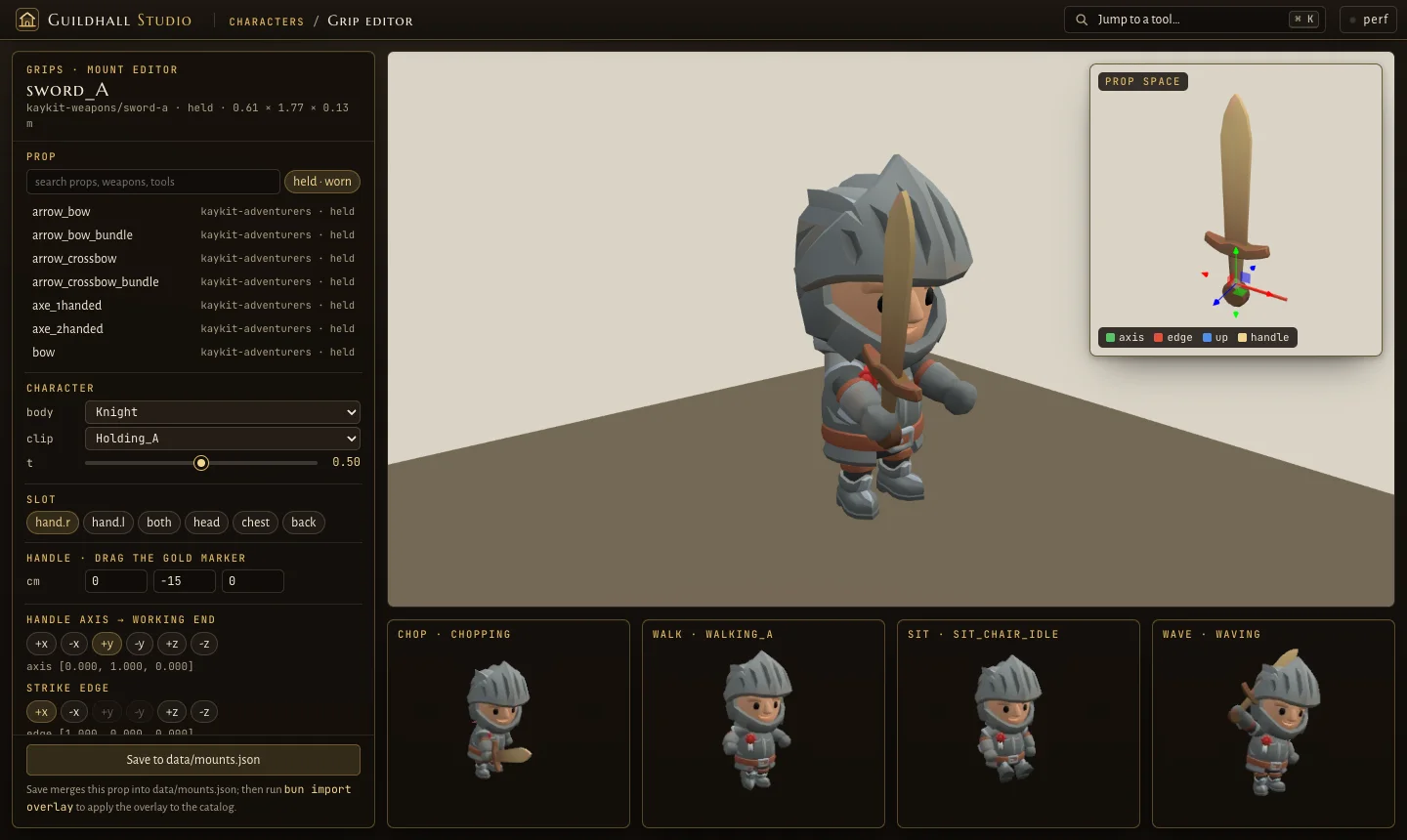
Grips are authored in the Studio's grip editor (from part 1): pick a prop, click the axis and edge, drag the gold handle marker, and watch the same character chop, walk, sit and wave with it below.
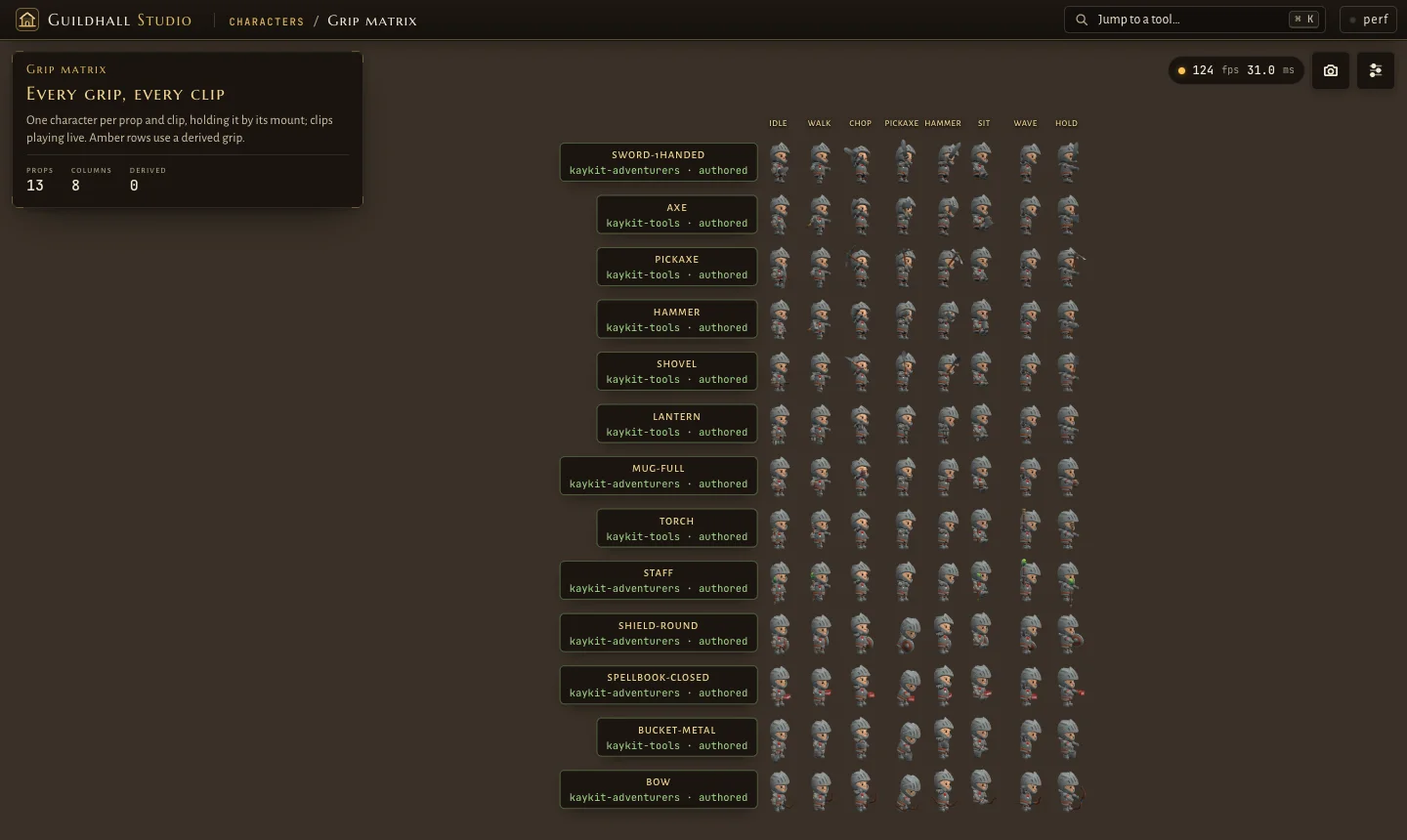
Then the grip matrix puts every prop in every clip on one sheet. It is the closest thing this project has to a visual regression test.
The shield that was backwards on every clip
Here is the honest part. The matrix had existed since the first days of V2. The round shield was in it. And the shield was mounted backwards on every clip, painted face against the knight's arm and bare back facing the enemy, for days.
The matrix had it on screen the whole time. Nobody read it, because the matrix looked at every character from the front, where a shield on the left forearm is hard to judge. It was caught in the world instead, in the same note as the "kissing knights" further down, and queued as "the knight's shield grip, flat on the forearm, per clip".
The fix was one sign in the data:
Plus a quarter turn for the two-handed guard, so the shield stands upright in front of the chest. Plus one change to the tool: the matrix gained a yaw= parameter, so it can look at a character's left side. A visual test is only as good as the camera you point at it.
Stride-matched walking: feet that don't skate
The next one showed up while following a hero on a long errand. Heroes could run up to 7 m/s, and the run clip just played faster. The note in the decision log: heroes run up to 7 m/s → legs cycle frantically.
At 7 m/s, the KayKit run clip was playing at about 2.3× its own pace. And the townsfolk had the opposite problem: their walk cycle covered 1.3 m per cycle on screen, about 0.83 m too long for the clip's actual stride, so their feet slid along the ground like ice skaters.
The fix is not a smarter animation. It is a measurement. Each locomotion clip has its own ground speed: the speed its planted foot pushes the ground backward on the rig. Measure it once, and then the clip's play rate is simply speed divided by that ground speed. Feet stay where they land.
1// packages/sim/src/life/gait.ts (simplified)
2export const GAIT_MPS = {
3  Walking_A: 0.78,
4  Walking_B: 0.86,
5  Walking_C: 0.5,
6  Running_A: 3, // KayKit's run
7  Running_B: 5, // the long-striding run: the sprint
8};
9export const GAIT_RATE_MAX = 1.6; // past it the legs whirl
10export const GAIT_RATE_MIN = 0.6; // below it a run floats
11export const SPRINT_FROM = 4.4; // m/s
12
13export function gaitOf(mps: number): string | undefined {
14  if (mps >= SPRINT_FROM) return 'Running_B';
15  if (mps >= RUN_FROM) return 'Running_A'; // 3 × 0.6 = 1.8 m/s
16  return undefined; // the body's own walk
17}
Then every gait gets a band. Walks stay at or under about 1.18× their own pace. A run starts at 1.8 m/s. From 4.4 m/s a hero switches to the sprint clip, and nothing ever plays past 1.6×. A test sweeps every speed a hero can move at and asserts the clip it gets plays inside its band. A later change capped heroes at 5 m/s instead of 7, once the roads ran straighter.
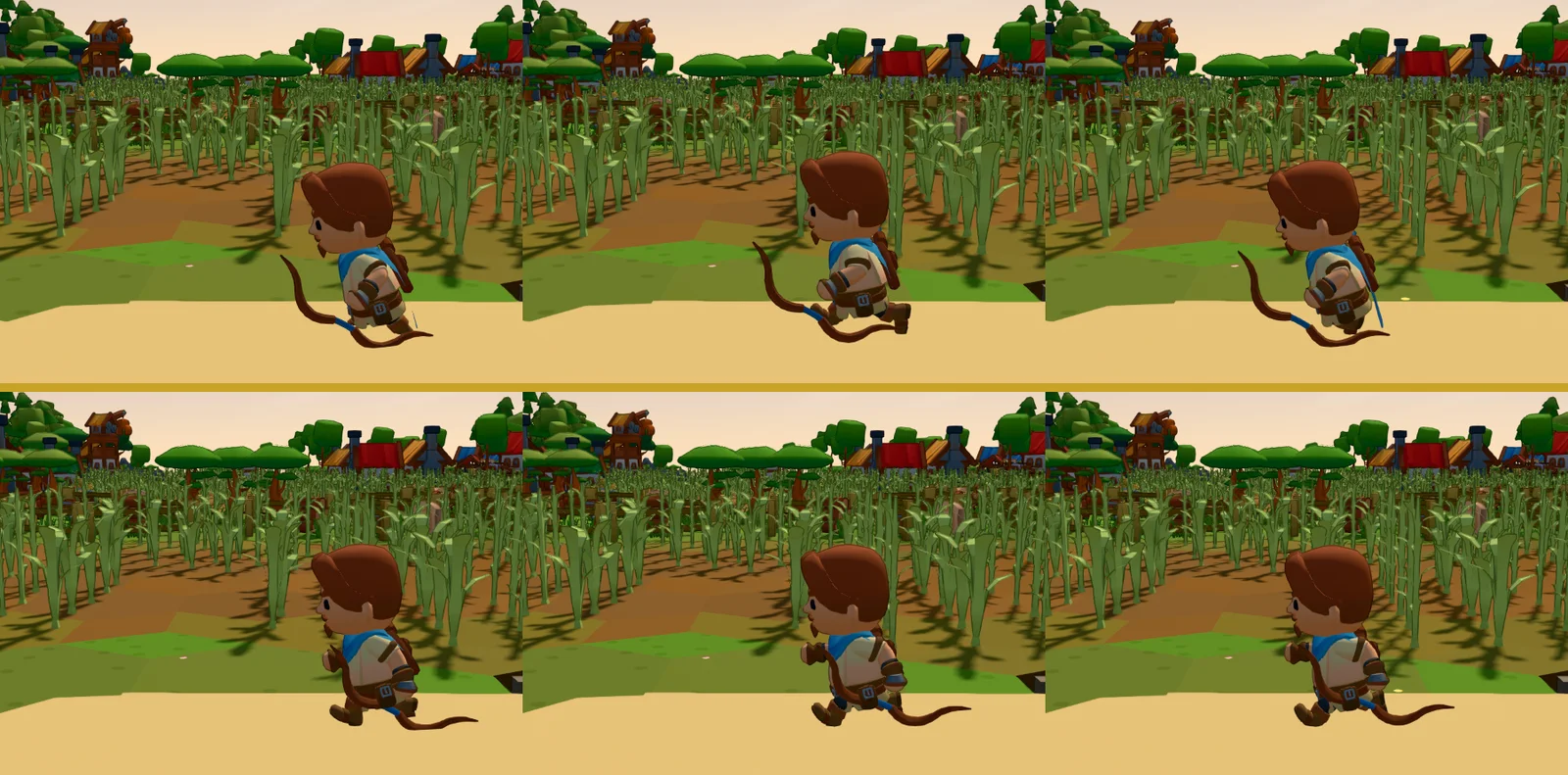
This is a good example of what I mean by experience. Stride matching is textbook, and any model writes it once you name it. The work is in looking at a hero crossing a field, saying "the legs are wrong", and knowing why: the clip plays over its own ground speed, so measure the ground speed.
Routines with timing
A world feels alive when things happen together and at the right moment. The townsfolk's evening is written as timed routines, and the timing constants are design decisions, not implementation details.
- The tavern toast. Every patron at a tavern tile runs on one clock. Seated drinkers rise at 26 seconds into the cycle, and every mug goes up at 26.8. The bard leads a 12-second song in the last cycle of each block. One clock per tile means the whole beer garden toasts at once.
- The tipsy walk home. Nobody is drunk by daylight: a tipsy walk leaves the tavern no earlier than 21:00 and gets home before midnight. It is slower (up to 1.5×), weaves from side to side, and stops halfway against a wall. The first version sent 45% of the late drinkers home tipsy. I picked 30%.
- The lamplighter. The world plan names each lamp post and the hour its lamplighter reaches it, and the renderer keeps that lamp dark until then. My only instruction was "lamps light only when the lamplighter reaches them". Everything else followed from that.
- Chats and waves. Two walkers whose paths cross stop 1.0 to 1.6 m apart and take turns talking, 2.6 seconds each. Two who see each other coming down a road wave from 4 to 8 m away.
Duels: distance is choreography
Knights spar at the training arena and at drill spots around the castle. The arena bouts were 19 seconds of alternating blows: the winner cheers, and a lone duellist waits instead of swinging at air.
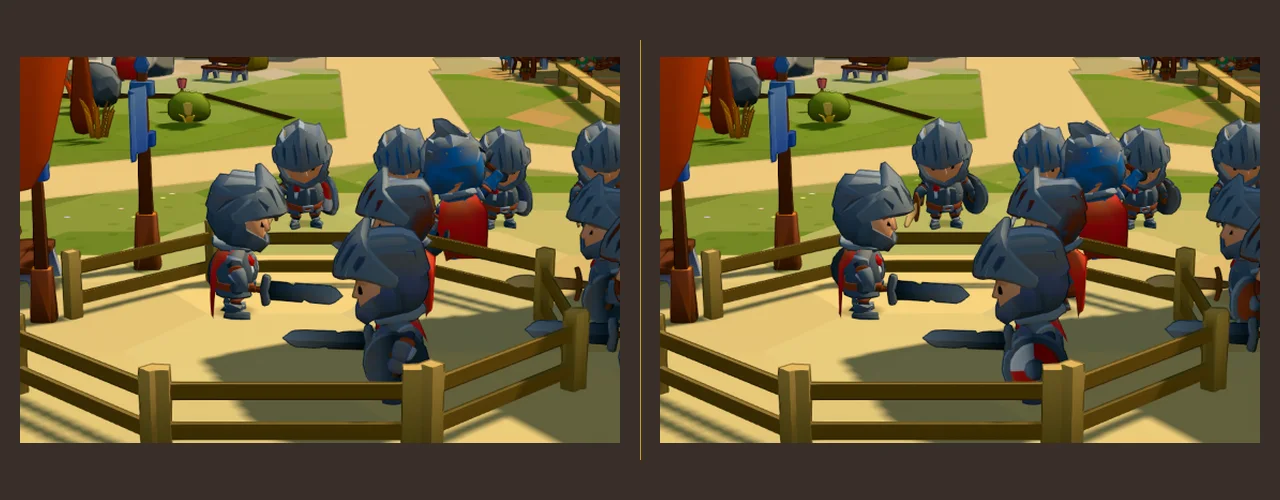
Then I saw two knights fighting with their helmets fused together beside a building door. I called them the "kissing knights". The arena pairs were already spaced, but the heroes' sparring spots kept only 0.9 m from other people.
Now one constant, DUEL_APART = 1.6 m, is shared by every source that puts two fighters face to face. Its comment says why: two bodies, a shield and a sword's reach between them, so a blow lands on the shield and the helmets never touch. For the bout, each side steps in by half the difference, to 1.5 m at the closest (it was 1.32). A test asserts the distance for every pairing source.
The story clock never stops
Guildhall replays agent sessions as stories, and everything (heroes, captions, the camera) runs on a story clock. Then a story ended and the world froze: life halted mid-task, heroes stopped mid-road. The story clock had stopped, and life was reading it.
The fix was a second notion of time. Life looks at lifeAt, which keeps running past the end of the story. When a session ends, heroes finish their current animation, walk to the Guildhall or the tavern, sit, toast in the evening, or go in at a door at night. A hero who fell rises as a pale ghost, drifts to the graveyard and fades at a grave. They never stop mid-walk.
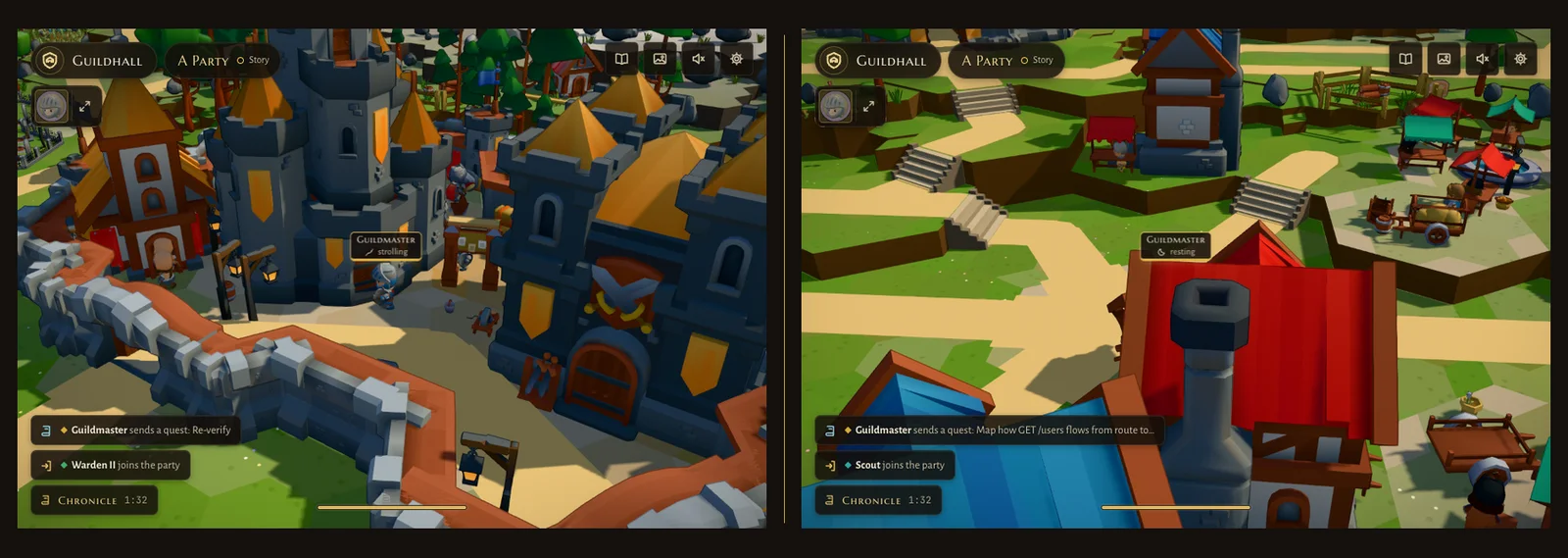
Time compression needed the same care. Watch it grow plays a repository's whole history in 40 seconds at 1×. Following the real date, the island flicked through a season every second or so. My note: changes too fast. Now each chapter keeps one season (that of its last day) and the season eases between chapters. At rest or while scrubbing, you see the real day.
Natural motion: nothing moves on a rail
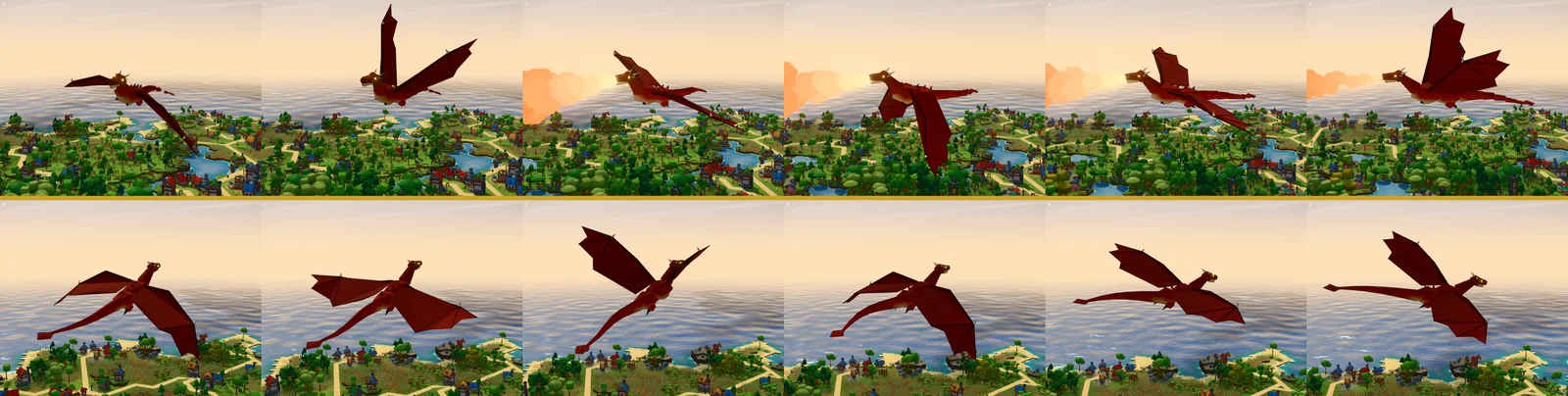
My note after the first sky shows: "dragon flight feels unnatural", with a list to tweak later: wing-flap rhythm, banking, glide and soar arcs, altitude changes. The boats got the same treatment in the same pass.
Boats now ride the swell the water shader actually draws. The hull is sampled at the bow, stern and beam for heave, pitch and roll. A small boat bobs on every wave; a big one lags and averages the swell over its length. Boats heel into turns, gather and lose way, overshoot their berths, and swing a few degrees at anchor.
The dragon flies in acts: a burst of three to five wing beats while climbing, then a long glide on still wings, sinking. Some acts end in a swoop: the wings rise, it dives on the peaks, breathes fire at the bottom and beats hard to climb away. It sinks faster than it climbs. It banks with its body and tail following the wings. Every value comes from tables built once per show from a seed, so play, seek and a paused frame all show the same dragon.
Real elapsed time, at any frame rate
The last one is about time itself. When a phone can't hold its display's rate, the frame rate jumps around, and even if every single frame is fine, the motion stutters. My instruction is quoted at the top of pace.ts: rather a steady 30 than a rate jumping between 60, 40 and 30, and quality never drops to buy fps. So the stage can draw on every second (or fourth) vsync, and Settings → Motion offers Auto, Smooth 30 or Max. How the pacer works is in part 5.
What makes that safe for animation is the rule underneath: everything runs on real elapsed time. A hook's dt is the real time since the last drawn frame, so nothing moves slower at 30. Stride matching works off metres covered, not frames. The dragon, the boats and the lamps are functions of the clock, not of a frame counter. The check for it is visual too: a camera ease turns exactly 90.0° in one second at Max and at Smooth 30.
What I'd tell you to steal
When the requirement is 'it looks right', your job is to turn the look into a measurable fact (a ground speed, a distance, an hour) and then point a camera at it from the angle where it can fail.
”The lesson
AI wrote most of the motion code in Guildhall, and it was good code. But every fix in this post started the same way: someone watched the world and said that's wrong, then knew enough about animation, physics or timing to say exactly what was wrong. Precise words, a mock or a reference, a number with a reason. Then the model was fast.
"It looks right" is the hardest requirement because nobody can write it down until they have seen it look wrong.
Next in the series, part 5: performance, and how Guildhall holds 60 fps for a whole kingdom, even on a phone, without changing a single pixel of the look.
See it for yourself at guildhall.codestz.dev (try a town at dusk), and the code is on GitHub.